
Free · Windows · Works offline
P6 programme in.
A3 time chainage chart out.
See what is behind the P6 programme, without opening P6.
Your programme stays on your computer. Nothing is uploaded, and nothing is written back to P6.
Download free
Between P6 and Excel

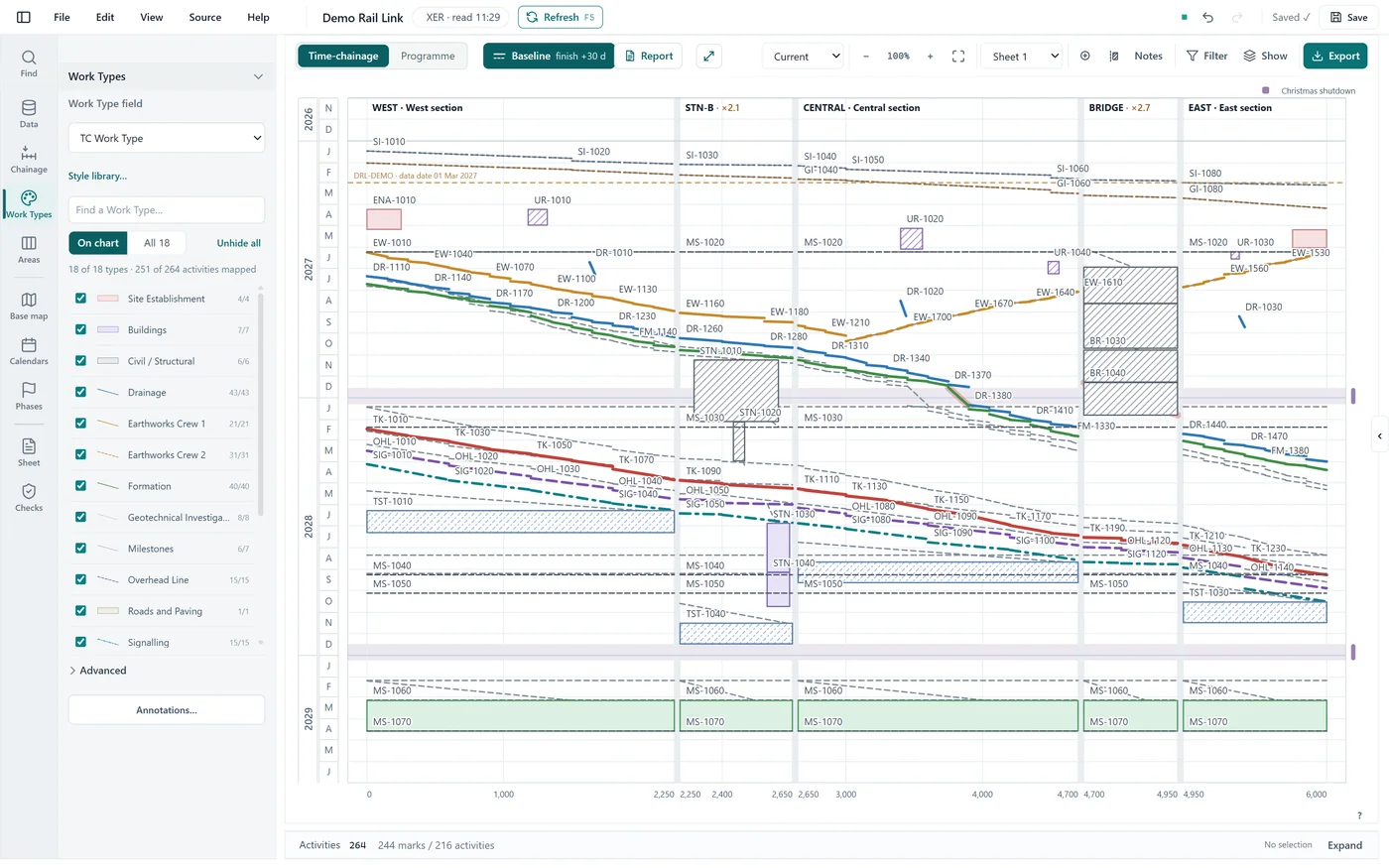
In P6 the programme is a list of activities, each with a bar, and no sense of where on the route each job is. In Excel it is rows of numbers. TCC draws the same programme along the route. Fictional job DRL-DEMO, drawn by TCC, unedited.


How it works
-
Step 1
Open the programme
A P6 Professional database or an XER export. TCC reads it read-only and keeps its own snapshot.
-
Step 2
Map the locations
Read the location from a P6 field, such as
CH1200-CH1800in a UDF, or set it in TCC itself. Work types become line and block styles. -
Step 3
Print the sheet
A3 or A4 PDF with legend, title block, logos, drawing number and revision. PNG and SVG for reports.
New to these charts? Start with how to read a time location chart, then linear scheduling from P6 and time distance charts from an XER.
A Windows program, not a website
No account, no upload. The programme, the chart and the saved workspace stay on your machine. Reopen the workspace when the next P6 update comes in and the mapping is still there.
- Crews
- Style a work type once; every activity in it follows
- Time axis
- Runs down, or up for work that climbs, such as dam lifts
- Title block
- Drawing number, revision, status, checked by, up to three logos
- Workspace
- One
.tcc.jsonfile per chart
Free download · Version 1.0
Free for everyone
Every feature, with no account and no activation code. Printed sheets carry a small “Made with Time Chainage Chart” line.
Installs in one click and the Store keeps it up to date.
Version 1.0 · 19 MB
If Windows shows “Windows protected your PC”, click More info › Run anyway.
- System
- Windows 10 or 11, 64-bit
- Also needs
- Edge WebView2 and .NET Framework 4.6.2 or later. Most Windows PCs have both.
- Reads
- P6 Professional database, or an XER export
- Internet
- Not needed. The installer version looks for updates once a day; you can turn that off.
Questions
What counts as a separable portion?
Any part of the job you want on its own axis: a pipeline, a plant, a pump station, a branch line. In TCC it is called an area. The code can come from a P6 activity field or be assigned in TCC.
Where do the stages and gates come from?
From the WBS in P6. Choose the WBS level that holds the stages. A gate is read from the stage name, such as Stage 2 - Civil works (Gate 2), and can be typed or cleared in TCC. Key dates are the milestones in a WBS you pick.
Do the people I send it to need P6?
No. TCC reads an XER export, so a project manager or client can open the chart and the programme without a P6 licence. Setting the chart up takes a few minutes; reading it needs nothing.
Will TCC change my P6 programme?
No. P6 databases and XER files are opened read-only. Mapping and styles live in TCC's own workspace file.
Does TCC reschedule anything?
No. P6 stays the scheduling tool. TCC draws each activity from its P6 dates and its mapped location.
Some activities have no location. Is that a problem?
No. Design, procurement and approvals usually have none. TCC charts the activities that do and leaves the rest off the drawing.
Is my project data sent anywhere?
No. Everything runs on your computer.
Does TCC have SOC 2 or ISO 27001 certification?
No certificate — and nothing to certify. TCC is an offline desktop program with no account, no sign-in and no cloud component, so your project data never leaves your computer. The only network use is the installer version’s once-a-day update check, which you can turn off; the Store version never checks.
What do I need to run TCC?
A 64-bit Windows 10 or 11 PC with Edge WebView2 and .NET Framework 4.6.2 or later — most Windows PCs have both — plus a P6 Professional database or an XER export. No internet connection needed.
Microsoft Store or the installer?
Same program. The Store version installs without a security warning and the Store keeps it up to date. The installer is for PCs where the Store is turned off; it checks timechainage.com for updates once a day.
What will it cost?
Nothing. TCC is free for everyone, with every feature. Printed sheets carry a small “Made with Time Chainage Chart” line; email [email protected] if you need sheets without it.
Can my company use it?
Yes — it is free for everyone, including company use, with every feature. For deployment or support questions, write to [email protected].